
34 live tools for LinkedIn Ads, every write held for your confirmation, inside the same server that runs Google Ads, Meta, GA4, and GTM. Compared honestly against Adkit and Adzviser.
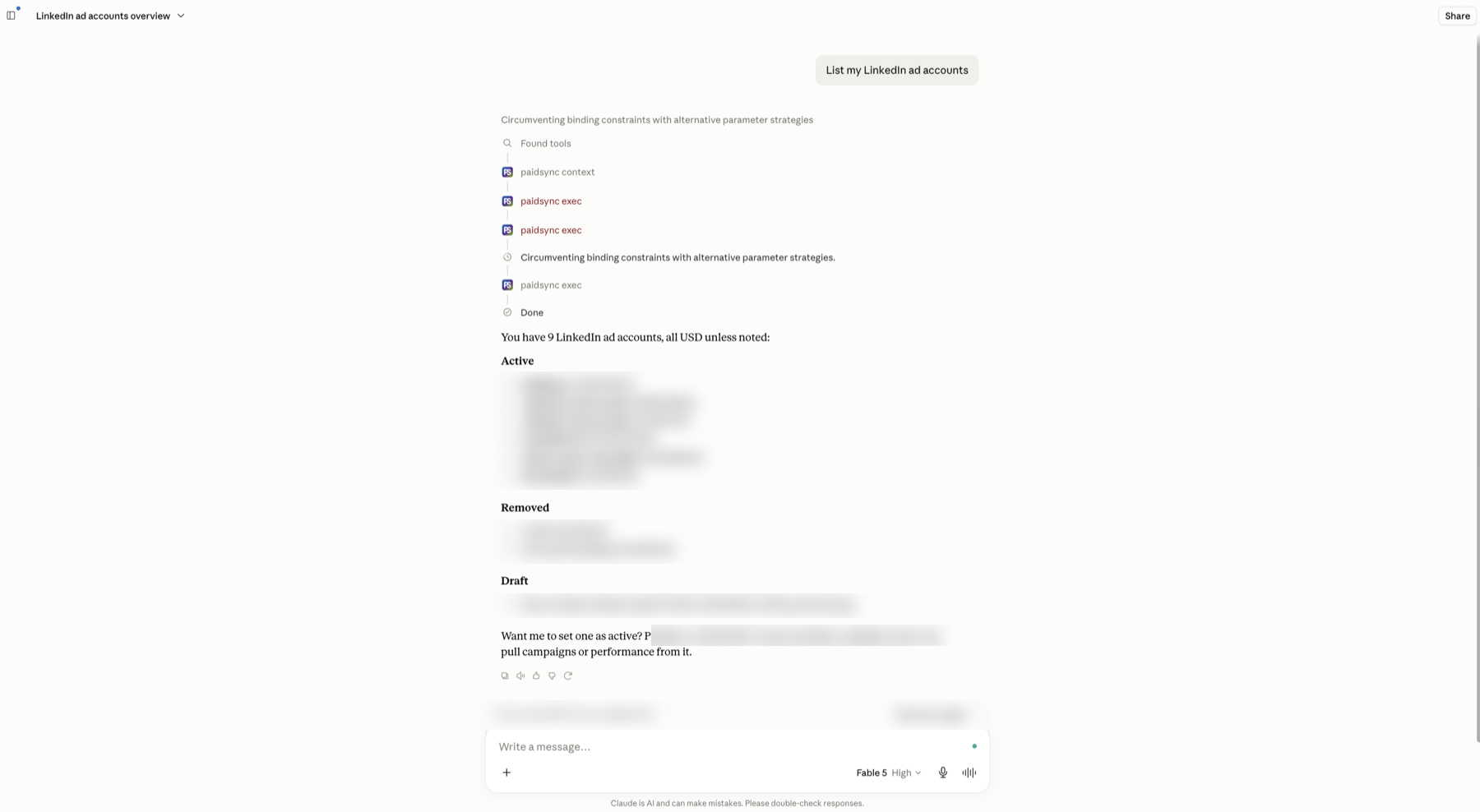
PaidSync is the LinkedIn Ads MCP that runs and manages LinkedIn campaigns from inside Claude, ChatGPT, or Cursor, connected once, approval-gated writes, part of a 13-platform ads and measurement stack starting Free at 15 tasks per month. For teams that only run LinkedIn Ads, Adkit's LinkedIn Ads MCP ships at $29 to $49 annual; for teams running LinkedIn alongside Google, Meta, TikTok, or Microsoft, PaidSync exposes the full toolset in one MCP server.
An MCP server turns an ad platform's API into typed tools an AI assistant can call. Connect one to Claude or ChatGPT and "pause every LinkedIn campaign with a cost per lead above $120" becomes a command the assistant can verify, propose, and, once you confirm, execute. This page covers PaidSync's LinkedIn surface in full: what the 34 tools do, how the approval gates work, what the server deliberately does not cover, and how it compares against the two other LinkedIn Ads MCP options active in August 2026.
The page is written for both audiences. Marketers who want to manage LinkedIn campaigns from a chat window, and agent builders who want to know exactly what the protocol surface looks like before wiring it into a workflow. Each section is labeled so you can skip to what matters.
What a LinkedIn Ads MCP server does
Three things in practice. It reads, so the assistant can pull impressions, clicks, leads, and cost per result without you exporting from Campaign Manager. It writes, so campaigns, campaign groups, ads, creatives, targeting, and conversions can be created or changed through conversation. And it gates, so nothing the AI proposes runs until a human confirms it. The reading part is available on several LinkedIn MCP options. The depth of the write surface and the honesty of the gating are where they differ.
All 34 LinkedIn tools by category
PaidSync's live server exposes 34 LinkedIn tools (server total 500+ across 14 platforms). All 34 are named in the table below; the live count is also fully discoverable from any session via paidsync_context with include_tools:['linkedin_ads'].
| Category | Named tools |
|---|---|
| Account and identity | connect_linkedin_ads, linkedin_auth_status, list_linkedin_ad_accounts, set_linkedin_ad_account |
| Campaign groups | list_linkedin_campaign_groups, create_linkedin_campaign_group, update_linkedin_campaign_group |
| Campaigns | list_linkedin_campaigns, create_linkedin_campaign, update_linkedin_campaign, pause_linkedin_campaign, enable_linkedin_campaign |
| Ads and creatives | create_linkedin_ad, update_linkedin_ad, list_linkedin_creatives, create_linkedin_creative, update_linkedin_creative, list_linkedin_creatives_with_media, get_linkedin_ad |
| Creative media | upload_linkedin_image, upload_linkedin_video, create_linkedin_image_upload_url |
| Lead gen forms | list_linkedin_lead_forms, create_linkedin_lead_form |
| Audience and targeting | get_linkedin_campaign_targeting, update_linkedin_campaign_targeting, search_linkedin_targeting_entities, get_linkedin_audience_size, get_linkedin_campaign_forecast |
| Conversions | list_linkedin_conversions, create_linkedin_conversion, add_linkedin_campaign_conversions |
| Performance reporting | get_linkedin_performance, get_linkedin_performance_by_dimension |
Three of these carry the most operational weight. create_linkedin_campaign builds a full campaign against an existing campaign group, with objective, bidding type, daily or lifetime budget, targeting facets, and status set in one call. update_linkedin_campaign_targeting patches the targeting spec on a live campaign, job functions, seniorities, industries, company sizes, and member skills, without rebuilding the campaign. And get_linkedin_performance_by_dimension breaks performance by campaign, creative, geography, job function, company size, member age range, or any combination, so cross-cuts that take clicks in Campaign Manager take one prompt here.
For marketersRun LinkedIn Ads from a chat window
A practical week looks like this. On Monday you ask what changed in the last 7 days across LinkedIn campaigns. The assistant pulls spend, leads, and cost per lead from get_linkedin_performance and gives you a plain-number answer. You spot an ad group targeting too broadly, ask for the targeting breakdown, review it, and ask the assistant to tighten seniority to Director and above. It proposes the update_linkedin_campaign_targeting call with the exact change shown; you confirm, it applies.
Because the same server carries Google Ads (140+ tools), Meta Ads (83 tools), GA4 (26 tools), and GTM (39 tools), the follow-up question "did the new LinkedIn creative produce GA4 conversions at a lower CPA" is answered in the same session, not in a separate tab. For teams running cross-channel demand generation, that session continuity is the practical difference between a LinkedIn connector and a paid-media server.
Write access brings an honest concern about safety on live ad accounts. The answer is procedural. Nothing applies without your confirmation step in chat. Most write tools accept a dry_run parameter that returns the planned payload without executing it. Sessions can be revoked at any time from the PaidSync connect panel. Read operations never require confirmation because they change nothing.
Connect LinkedIn Ads in Claude or ChatGPT and run the first report in minutes.
Start free, 15 tasks, no card See all plansThe protocol surface behind the 34 tools
PaidSync is one MCP endpoint covering 14 platforms; architecture detail is on the MCP server page. To keep client context small, tools/list returns a lean starter set. The full catalog is discovered at runtime through paidsync_context, which returns the active account, connected platforms, and the grouped tool catalog. Pass include_tools:['linkedin_ads'] to get the exact LinkedIn tool names, signatures, and approval-gate defaults. Then execute any tool through paidsync_exec via await paidsync.call('tool_name', {...args}). That two-call pattern means an agent can enumerate and invoke all 34 LinkedIn tools without a 500+ tool schema payload in every conversation turn.
Safety is enforced server-side. Writes are approval-gated, most mutation tools accept dry_run for a no-op preview of the planned change, and sessions can be revoked without touching the OAuth client. For discovery and verification, the domain publishes OAuth authorization-server and protected-resource metadata (RFC 8414 and RFC 9728), an MCP server card, agent-auth.json, security.txt, and a Content-Signal directive, so an agent can establish what this server is and how to authenticate before its first task.
LinkedIn's Marketing API enforces rate limits per application per member, at tighter thresholds than Google or Meta for some account classes. High-volume reporting loops (pulling performance for hundreds of campaigns per minute) will hit those limits. Design polling loops with a back-off and prefer dimensional breakdowns over per-campaign loops where possible.
PaidSync vs Adkit vs Adzviser
Three LinkedIn Ads MCP options exist in August 2026. Adkit expanded to LinkedIn in July 2026. Adzviser has offered a LinkedIn reporting connector since earlier in the year. The comparison below uses each vendor's published pricing and the tool counts verifiable from their public pages as of August 2, 2026.
| Dimension | PaidSync | Adkit | Adzviser |
|---|---|---|---|
| LinkedIn tools | 25 | Subset of 23 total | Reporting connector |
| Write access | Full (create, update, pause, enable) | Write capable, no approval gates | Read-only |
| Approval gates on writes | Yes, every write held for confirmation | No, applies immediately | Not applicable |
| Platform scope | 14 platforms (Google, Meta, LinkedIn, TikTok, Snapchat, Reddit, Pinterest, Microsoft, GA4, GTM, GSC, GMC, ChatGPT Ads) | Google, Meta, LinkedIn | 45+ sources, reporting only |
| LinkedIn Marketing Partner | Yes, company-verified | Not listed | Not listed |
| Cross-platform session (LinkedIn + GA4) | Yes, same session | No | No |
| Conversion tracking creation | Yes, create_linkedin_conversion | Not listed | No |
| Price | Free $0 (15 tasks), Pro from $99/mo | From $29/yr (annual), $49/mo (monthly) | From $48.99/mo |
Quick verdict.
LinkedIn is your only ad channel and your needs are core campaign management: Adkit at $29 to $49 annual is the honest budget pick. It covers LinkedIn alongside Google and Meta and the annual price is low.
You need LinkedIn reporting only and run it alongside 40-plus other data sources: Adzviser covers that reporting use case well, read-only at $48.99 per month.
You run LinkedIn alongside Google, Meta, TikTok, or any measurement stack, or you want approval gates before writes touch a live account: PaidSync. One session covers all of it, the LinkedIn write surface is deeper, and the gates are real.
Is there an official LinkedIn Ads MCP server? (checked September 2026)
No. As of September 2026, LinkedIn's developer docs do not list one. The LinkedIn Marketing API documentation covers REST endpoints for Campaign Manager and nothing under the Model Context Protocol. Google, Meta, TikTok, and Microsoft each publish a first-party server for their ad platform. LinkedIn does not. Every LinkedIn Ads MCP you can use today is third party, built on the Marketing API through the vendor's own approved developer application.
Two things follow. A first-party server, if one ships, will most likely cover LinkedIn only, the way Google's official Google Ads server and Microsoft's Advertising server each cover one platform. And the write surface, the approval gating, and the cross-platform session stay the vendor's job. The table uses the same rows as our Google and Meta pages so the gap is easy to read.
| Dimension | LinkedIn, first party | PaidSync |
|---|---|---|
| Who hosts it | Nobody yet. The developer docs list REST endpoints only, checked September 2026 | Hosted at mcp.paidsync.ai, connect and go |
| Read or write | Not defined. The Marketing API itself is read and write | Read and write. 34 LinkedIn tools, 15 reads, 17 writes, 3 of them create campaigns |
| Which clients | None, there is no server to add | Claude, Claude Code, ChatGPT, Gemini CLI, Copilot Studio, Perplexity, Cursor |
| Platforms covered | LinkedIn only, if one ships | 14 platforms in one session, LinkedIn alongside Google, Meta, TikTok, Microsoft, GA4, GTM, and more |
| Approval gating | Not defined | Every write held for approval, dry_run previews, confirm_destructive on destructive operations |
| What PaidSync adds | A wrapper LinkedIn has not built | One endpoint, 500+ tools, cross-platform questions in one prompt, verified LinkedIn Marketing Partner |
Connect LinkedIn Campaign Manager to your AI client
The endpoint is the same in every client, https://mcp.paidsync.ai/mcp. Sign-in is OAuth 2.0 with your PaidSync login. Once the client is connected, run connect_linkedin_ads to authorize your Campaign Manager account, then set_linkedin_ad_account to pick the account the session works on. The steps below are checked against each vendor's own docs.
Claude
In claude.ai or the Claude Desktop app, open Settings, then Connectors, search PaidSync, click Connect, and sign in with your PaidSync login. Connectors work on every Claude plan, including Free, which allows one custom connector. Full walkthrough at connect LinkedIn Ads to Claude.
Claude Code
Run claude mcp add --transport http paidsync https://mcp.paidsync.ai/mcp. Start a session, type /mcp, pick paidsync, and sign in with your PaidSync login in the browser window that opens. For a team, commit a .mcp.json at the repo root with the same http server entry.
ChatGPT
Open Settings, then Security and login, and turn on Developer mode. Go to chatgpt.com/plugins, click the plus button, name the app PaidSync, paste the server URL, and choose OAuth. Sign in with your PaidSync login the first time a PaidSync tool runs. Developer mode is available on Plus, Pro, Business, Enterprise, and Education plans on the web. Full walkthrough at connect LinkedIn Ads to ChatGPT.
Gemini CLI
Run gemini mcp add --transport http paidsync https://mcp.paidsync.ai/mcp, then /mcp auth paidsync and sign in with your PaidSync login. Gemini Code Assist and Antigravity read an httpUrl entry in ~/.gemini/settings.json. The consumer Gemini app does not accept custom MCP servers. Full walkthrough at connect LinkedIn Ads to Gemini.
Copilot Studio
Open your agent, then Tools, Add a tool, New tool, Model Context Protocol. Paste the server URL, choose OAuth 2.0 with Dynamic discovery, transport Streamable HTTP. Click Create, then Add to agent, test, then publish to the Microsoft 365 Copilot channel. Copilot Studio needs a work or school account. The consumer Copilot app does not accept custom MCP servers. Full walkthrough at connect LinkedIn Ads to Microsoft Copilot.
Perplexity
Open your profile menu, then All settings, then Connectors, then Custom connector. Name it PaidSync, paste the server URL, choose OAuth and Streamable HTTP, save, and sign in with your PaidSync login when prompted. Connectors work on every Claude plan, including Free.
Cursor
Add {"mcpServers":{"paidsync":{"url":"https://mcp.paidsync.ai/mcp"}}} to .cursor/mcp.json in your project, or ~/.cursor/mcp.json for every project. Open Cursor Settings, then MCP, and sign in with your PaidSync login when Cursor prompts for OAuth.
For read-only reports in any of these clients, an API key works as the URL, https://mcp.paidsync.ai/mcp?api_key=ps_your_key_here. Applying a change still requires the OAuth sign-in, and every write is held for your approval before it runs.
What this does not do
Stated plainly, because accurate scoping is more useful than overselling.
- Predictive Audiences beta is not exposed. LinkedIn's Predictive Audiences feature, currently in beta for some account classes, is not in the tool set. Standard saved audiences and targeting facets are fully supported.
- Document Ads and certain vertical-specific formats are not documented. If Document Ads are central to your LinkedIn strategy, verify support with the PaidSync team before committing.
- No campaign deletion. Campaigns are paused or archived, not deleted through the API. LinkedIn's own Marketing API design does not surface a bulk delete endpoint; the MCP matches that constraint.
- One object per task. Creating or updating 15 campaigns is 15 confirmed tasks or a structured loop in your agent. There is no single-call bulk mutator.
- No organic page posting or LinkedIn Pages management. PaidSync is paid media only.
- Rate limits apply. LinkedIn's Marketing API enforces per-application rate limits that are tighter than Google Ads or Meta Ads for some account classes and reporting dimensions. High-volume automation loops should build in back-off logic.
Pricing
Every plan includes all 14 platforms and there is no per-account or per-platform charge. The billing unit is tasks: each tool call, read or write, counts as one task. Full detail at paidsync.ai/pricing.
| Plan | Price | Included |
|---|---|---|
| Free | $0/mo | 15 tasks a month, no card required |
| Pro | From $99/mo | 600 tasks ($99), 1,200 tasks ($149), or 4,000 tasks ($199) |
| Team | From $249/mo | 5 seats, 6,000 shared tasks per month |
| Done For You | Custom | Fully managed paid media |
Connect LinkedIn Ads to your AI
One setup per client, same endpoint and sign-in everywhere.
- LinkedIn Ads to Claude (full guide)
- LinkedIn Ads to ChatGPT (full guide)
- LinkedIn Ads to Gemini (full guide)
- LinkedIn Ads to Microsoft Copilot
- LinkedIn Ads to Perplexity
Frequently asked questions
What is a LinkedIn Ads MCP?
An MCP (Model Context Protocol) server exposes an ad platform's API as typed tools that AI assistants like Claude and ChatGPT can call. A LinkedIn Ads MCP lets the assistant read campaign performance, create or edit campaigns, update targeting, and manage conversions through conversation instead of clicking through the LinkedIn Campaign Manager interface. PaidSync's LinkedIn surface covers 34 tools with full write access; Adzviser's LinkedIn connector is read-only, and Adkit's (launched July 2026) writes without an approval gate.
Is there an official LinkedIn Ads MCP server? (checked September 2026)
No. As of September 2026, LinkedIn's developer docs at learn.microsoft.com/en-us/linkedin/marketing list REST endpoints for the Marketing API and no Model Context Protocol server. Google, Meta, TikTok, and Microsoft each publish a first-party server for their ad platform; LinkedIn does not. Every LinkedIn Ads MCP available today is third party. PaidSync covers LinkedIn with 34 tools, read and write, every write held for approval, inside one endpoint that also covers 13 other platforms.
How do I run LinkedIn Ads from Claude or ChatGPT?
Connect PaidSync once at paidsync.ai/signup, then add the MCP endpoint https://mcp.paidsync.ai/mcp to your AI client's MCP configuration. Authorize your LinkedIn Ads account from the connect flow, then ask questions or give commands directly in the chat. The assistant proposes each write for your approval before anything changes on the account. Full setup guides for Claude and ChatGPT are available.
What LinkedIn Ads actions can PaidSync perform?
Full campaign lifecycle: create, update, pause, and enable campaign groups and campaigns. Ad and creative management: create_linkedin_ad, create_linkedin_creative, update_linkedin_creative, list_linkedin_creatives_with_media. Audience and targeting: get_linkedin_campaign_targeting, update_linkedin_campaign_targeting. Conversion tracking: list_linkedin_conversions, create_linkedin_conversion. Performance reporting: get_linkedin_performance and get_linkedin_performance_by_dimension for breakdowns by campaign, creative, geography, job function, company size, and more. The live catalog is discoverable via paidsync_context with include_tools:['linkedin_ads'].
Is PaidSync's LinkedIn Ads MCP write-capable or read-only?
Full write access. PaidSync can create campaigns, campaign groups, ads, creatives, and conversions, and update targeting, budgets, and status. Every write is approval-gated: the assistant proposes the change, you confirm, then it executes. Adzviser's LinkedIn connector is read-only. Adkit added LinkedIn write access in July 2026 without approval gates, meaning writes apply immediately when the AI calls the tool.
How does PaidSync's LinkedIn Ads MCP compare to Adkit and Adzviser?
PaidSync has 34 LinkedIn-specific tools with full write access, approval gates on every write, and is a verified LinkedIn Marketing Partner, inside a 500+ tool server covering 14 platforms. Adkit's LinkedIn MCP (launched July 2026) covers Google, Meta, and LinkedIn with 23 total ungated tools at $29 to $49 per year; writes apply without confirmation. Adzviser's LinkedIn connector is read-only at $48.99 to $148.99 per month, strong for reporting but cannot create or change anything. If LinkedIn is your only channel, Adkit at $29 annual is the honest budget pick. If you run LinkedIn alongside other platforms or want write gates before live changes, PaidSync is the right fit.
What does PaidSync's LinkedIn Ads MCP cost?
Free is $0 for 15 tasks a month with no card required. Pro starts at $99 per month for 600 tasks, with 1,200 tasks at $149 and 4,000 at $199. Team starts at $249 per month for 5 seats and 6,000 shared tasks. Done For You is custom-priced fully managed paid media. Every plan includes all 14 platforms; there is no per-account or per-platform charge. The billing unit is tasks: each tool call, read or write, counts as one task.
Put 34 LinkedIn tools, and the other 13 platforms, in front of your AI assistant today.